App surfaces
The Admin widget: its PROJECT and PLATFORM tabs, what each tab shows, and how it opens on a given panel.
The Admin widget opens from the Shield icon on the bottom dock rail. You can
open more than one Admin window, each with its own tab. It renders frameless in
the user's Widgets material (Opaque, Dim or Clear) and needs
project.dashboard, which every role holds, so every member sees at least the
system overview.
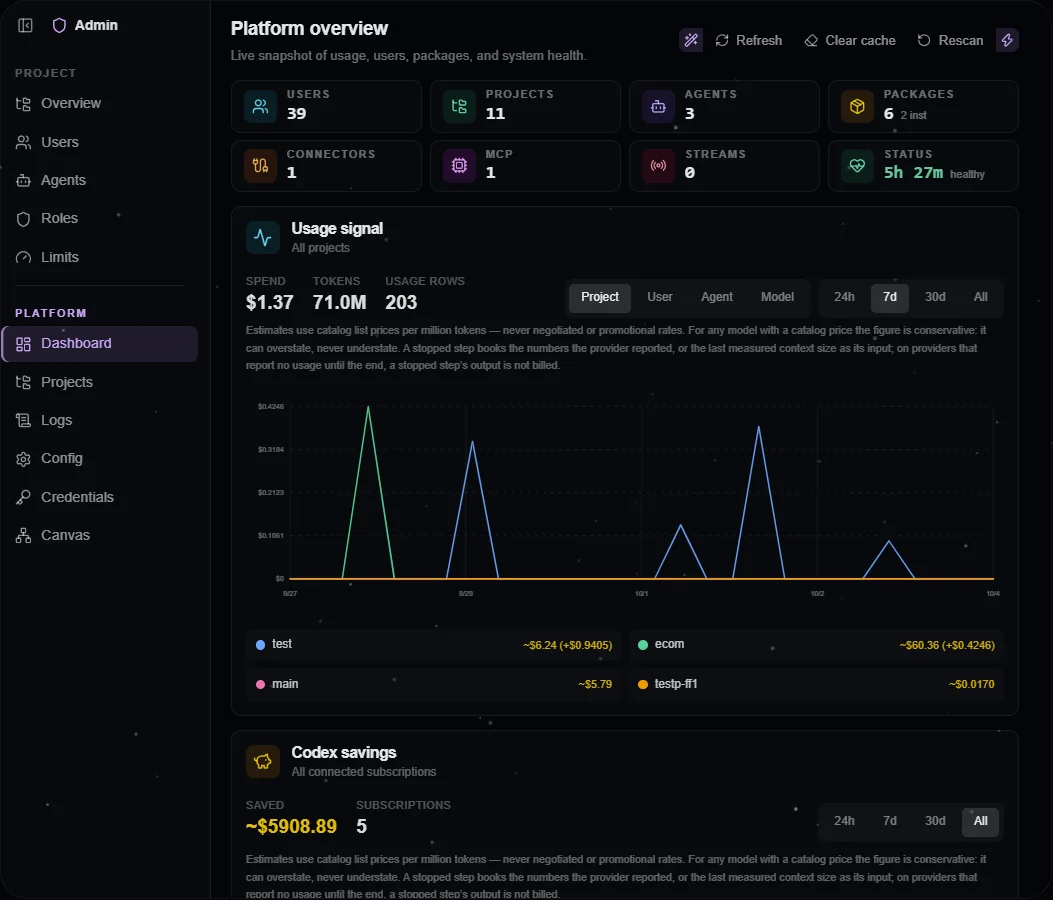
The platform Dashboard in a configured installation. Project administration is available through the same sidebar.
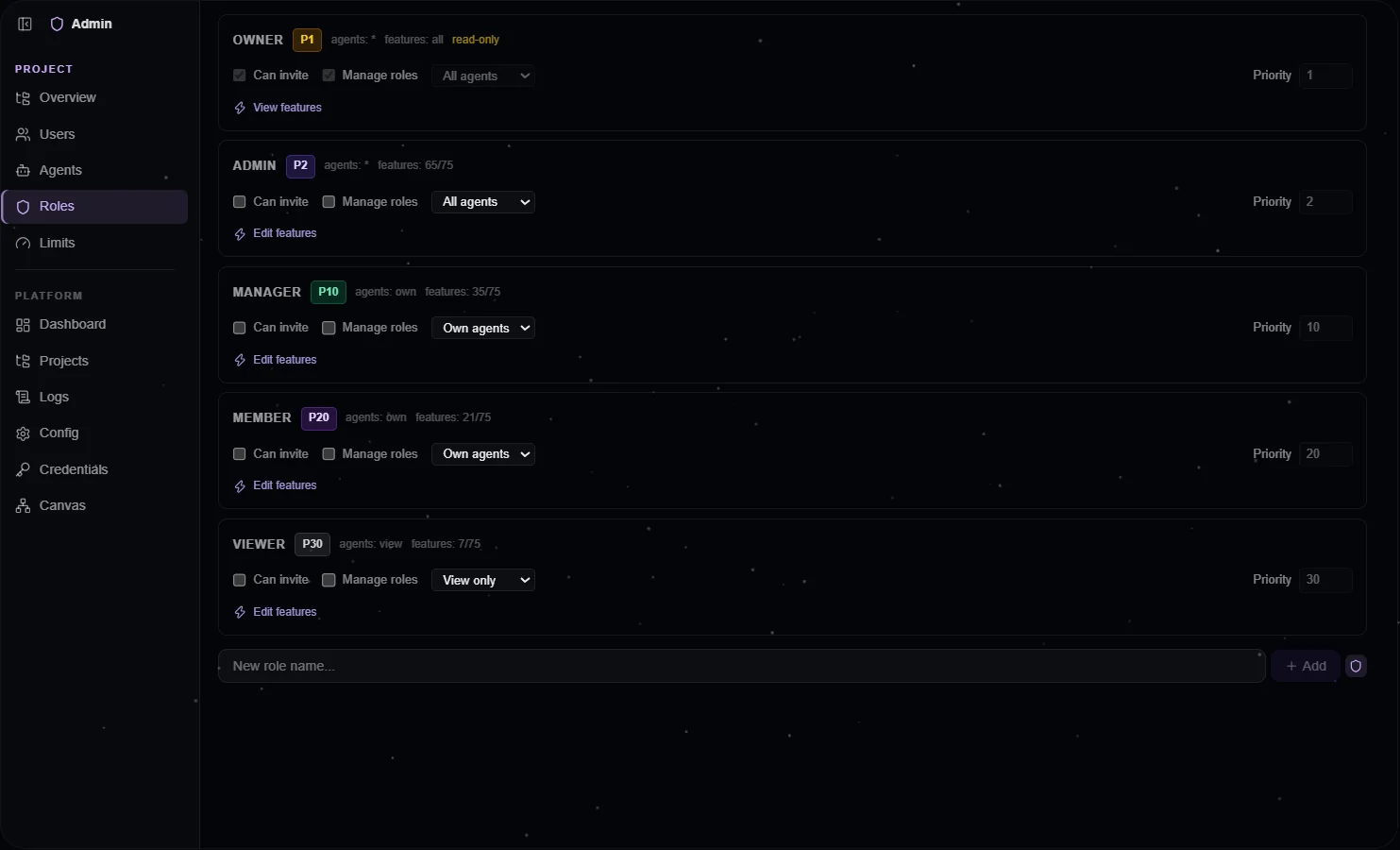
The Roles editor exposes feature grants and role priority; server-side rules govern changes.
Two scopes, one sidebar
- PROJECT acts on the active project: overview, users, agents, roles, limits, devices, packages.
- PLATFORM is instance-wide: dashboard, projects, logs, config, credentials, canvas, packages, devices.
Selecting a tab switches the scope. The sidebar shows labels, icons only, or nothing, and its header buttons name what they do (Expand sidebar, Collapse to icons, Hide sidebar, Show sidebar).
| Tab | Scope | Visible when |
|---|---|---|
| Project overview | PROJECT | Always |
| Users | PROJECT | project.members |
| Agents | PROJECT | Always (read-only without the role-management flag) |
| Roles | PROJECT | project.roles |
| Limits | PROJECT | Always (read-only without the role-management flag) |
| Devices | PROJECT | Always |
| Packages | PROJECT | packages.manage, or the role-management flag |
| Dashboard | PLATFORM | Always |
| Projects | PLATFORM | platform.projects |
| Logs | PLATFORM | project.audit |
| Config | PLATFORM | project.roles (its weakest section) |
| Credentials | PLATFORM | project.credentials |
| Canvas | PLATFORM | project.canvas |
| Packages | PLATFORM | platform.packages |
| Devices | PLATFORM | platform.users |
The Config tab gates each section the same way: Platform Settings needs
platform.config, Vector platform.vector, Roles & Features project.roles,
Source Configs project.sources. A tab or section you cannot use is absent,
never shown disabled; if a grant is removed, the widget falls back to the first
visible tab. Hiding mirrors the server gates on Features;
it is never the protection itself.
Dashboard and usage
The platform Dashboard is stats-first and visible at once: a KPI strip (users,
projects, agents, packages, connectors, MCP, streams, status with uptime), a
usage card, and cards for health, loaded packages, active streams and configured
LLM providers. A holder of platform.config also sees a version card: the
installed release beside the latest published one. Nothing is installed from
there. The project overview shows the same pattern for one project, plus a
member tree grouped by role priority.
The usage card offers 24h, 7d, 30d and All, a group-by toggle and a per-series
legend; the series arrive bucketed from the server. Above the chart it says
what the money means: estimates priced from the model catalog's list rates.
Without platform.users there is no per-user grouping, and without
platform.projects no platform scope, so a viewer never triggers a denied
request.
Users, agents and devices
The Users tab lists the active project's members (every user with
platform.users) and who is online on which kind of client. Disable, enable,
reset password and delete act on the platform-wide account, so a row offers
them only where the server says you govern that user in every project they
belong to. Delete opens a preflight naming the projects that would refuse it
and the personal credentials that go with the account.
The Agents tab attaches users to an agent and deletes an agent after an inline
confirmation; agent-core re-checks the delete against your real session. Every
agent is private to its creator until a user is attached: an attached user may
use it and shares its memory, identity, workflows, plans and logs, while
conversations stay per user. Attaching writes the project's data source policy,
so it needs project.sources; with the role-management flag the tab also
records who manages the agent. The Limits tab edits spend limits through the
host's project write, whose gate is the role-management flag.
The Devices tab lists paired devices live: in the PROJECT scope your own and other members' devices that carry a source you can see; in the PLATFORM scope every device. Revoking first shows what it would end (open terminals, background runs). A Pair one of your machines row carries the four commands to run on the machine, with this instance's address filled in. See Devices.
Roles
One card per role shows its feature grants and its priority (lower = stronger). A role at or above your own strength, your own role included, is read-only: its grants stay visible, the controls are inert. The priority input cannot go stronger than your own. Feature checkboxes come from the runtime catalog the host builds from every loaded package's declared features, with each feature's title, description and what it gates. The rules are on Roles.
Config, credentials, packages, logs, canvas
- Config: platform settings as one list with a filter by declaring package; environment-derived rows are read-only, and an override can be reset. The Vector section separates content indexing from semantic embedding: the active model serves, a target model waits for an explicitly started rebuild, and Full reset is confirmed separately. Custom LLM and embedding endpoints are edited here and accepted only from a signed-in person.
- Credentials: the scope-aware catalog. Values are write-only; the tab shows only whether one is set. Each row can carry a call ceiling per day, week or month (LLM provider keys follow the spend limits instead). OAuth-signed credentials show a status chip (valid, expires in …, expired, refresh failed), and the Codex sign-in acts on the scope the picker selects. See Credentials.
- Packages (project): every package the project runs that your scope may see, with its trust, state, owner, where it runs and its gating feature; mark a dropped package trusted or untrusted, build one, or gate it behind a feature. Per agent: which packages are on, its MCP servers and any withheld tool.
- Packages (platform): every package the host knows. Ask for an install by
name or upload a
.tgz; the request card shows who asked, what the package brings and its sha512. Approve and Restart now appear only for a holder ofplatform.packages.approve. - Logs: audit events and per-source logs, filtered by level and source in the browser.
- Canvas: a graph of users and agents with ownership and assignment edges; a node opens its detail.
Opening a given panel
The widget honors initialTab and scope from its instance state:
openWidget({
  agentId,
  type: 'admin',
  title: 'Admin',
  initialState: { initialTab: 'project-overview', scope: 'project' },
});
The project switcher's "Project settings" row is admin's: it opens the widget with exactly this call. Without the admin package there is no row.
The layout follows the widget's width: full labels from 720px, icons with tooltips from 480px, and below that a floating toggle opens the sidebar as an overlay.