Terminal
The PTY terminal widget: managed sessions, source-scoped tabs, supervision, and container/host execution planes.
The terminal is the human's own window into the same machine room the agents work in: an xterm.js widget in the browser, backed by real PTY processes spawned on the server and streamed over WebSocket. Sessions are scoped per user, project, and (optionally) agent, reaped once idle and unattached, and audited.
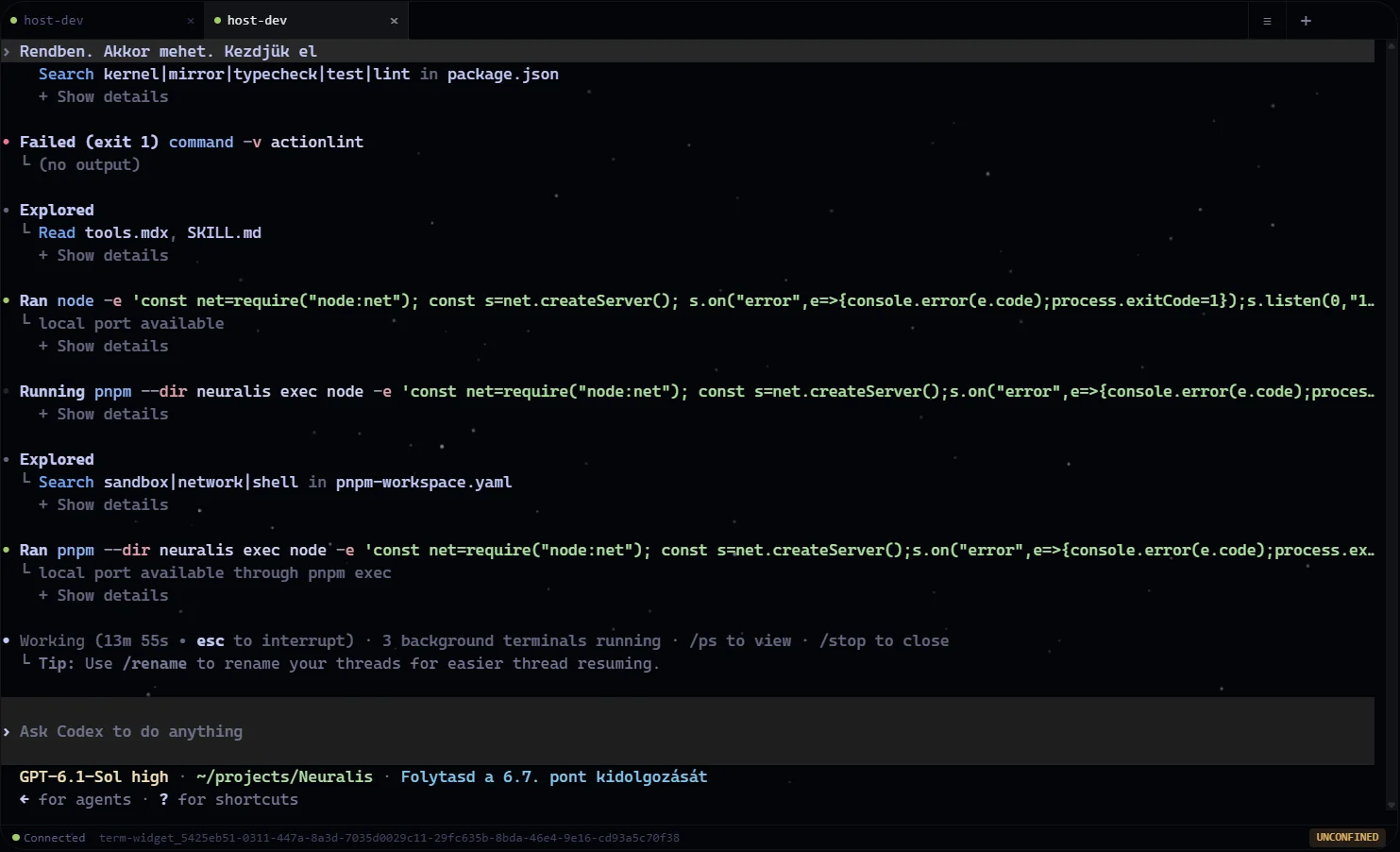
A configured host terminal running Codex. The sample output includes a failed actionlint invocation; terminal commands report their own results.
The terminal is part of agent-core. It shares the package with the agent runtime because the host-access plane needs the same PTY code, the same input guard, and the same URI-policy source index whether a session runs inside the container or on the host — one implementation, not two that drift.
One package, one visibility switch
Because chat, calendar, and the terminal are now surfaces of a single package,
a project owner who attaches a package-access feature to agent-core hides all
three together — the terminal is no longer hideable on its own. That is a
deliberate trade: it can only ever over-hide, never leak. For everyday
scoping, the per-surface terminal.read gate below still governs the terminal
independently.
No LLM-callable tools
The terminal contributes no model-visible tools, prompts, or resources, and
PTY output never enters an agent's context. When a model needs to run shell
commands it uses agent-core's execute tool, which
carries its own command analysis, URI-policy gate, OS sandbox, and environment
sanitization. Keeping the surfaces separate means agent shell access is governed
by one consistent, policy-gated path rather than by whatever terminal happens to
be open — and a human watching a terminal stays a different trust situation from
a model running commands.
Feature gates
| Feature | Granted by default to | What it unlocks |
|---|---|---|
terminal.read | manager, member, admin (and owner through the '*' wildcard) | See and open the terminal widget; the route feature for every terminal/* route. Without it the widget is invisible. |
core.execute | manager, member | Type into a session and stage a browser-pasted image for that session. A connection without it enters read-only mode — the server sends {type: "readOnly"} and drops every keystroke and resize — so terminal.read alone yields a view-only terminal. |
terminal.container | no grant below the admin tier — admin through its enumerated default grant, owner through the '*' wildcard; grantable to any custom role | Open the Container Root tab: a session rooted at / that bypasses source scoping but stays inside the container. Checked in-handler on session create and on source listing; 403 otherwise. |
terminal.native | no grant below the admin tier — admin through its enumerated default grant, owner through the '*' wildcard; grantable to any custom role | Open exact host-source terminal tabs through the host broker. The grant alone is not enough — see security. |
terminal.supervise | no grant below the admin tier — admin through its enumerated default grant, owner through the '*' wildcard; grantable to any custom role | List, attach to, take control of, and terminate every managed terminal in the project. Host sessions also require terminal.native. |
Viewers and newly created custom roles start with none of these, so a terminal
is invisible to them until an admin grants terminal.read. How roles map to
feature grants is covered in
roles and features.
Routes
Every route lives under /api/packages/agent-core/, requires terminal.read,
and derives userId, projectId, and the optional agentId from the verified
session — none of it is taken from client values on trust. The agent axis is
resolved against the agent store on every request, not merely read: a caller may
only act for an agent their role's agent access covers, and an agent id they
cannot use answers exactly like a session that does not exist. The same
resolution runs on both terminal WebSockets before either side of the supervise
comparison is computed.
| Route | Behavior |
|---|---|
GET /terminal/sessions | List the caller's live sessions. ?scope=project returns every project session only to terminal.supervise holders. Host rows additionally require terminal.native. |
POST /terminal/sessions | Create a PTY session on a required exact sourceSlug (or the synthetic Container Root slug). Accepts optional id, shell, cwd (an OS path — URI-shaped values are rejected with 400), env, cols, rows; a source-less create is rejected. |
DELETE /terminal/sessions/:id | Destroy a session. |
POST /terminal/sessions/:id/resize | Resize the PTY (cols, rows). |
POST /terminal/sessions/:id/exec | Run a command in an existing session and return its output, ANSI-stripped and capped. The session must already have been created with a source — the command runs inside that session's sandbox, and a missing session is refused. |
POST /terminal/sessions/:id/attachments | Stage one validated browser-pasted image inside the exact writable session's private scratch. Requires core.execute; host sessions also require terminal.native, and cross-user/cross-agent targets require terminal.supervise. A sessionAgentId naming an agent the caller cannot use is refused as not-found, never silently retargeted at their own session. |
GET /terminal/sessions/:id/read | Read recent scrollback lines. |
GET /terminal/sources | Enumerate the source tabs the caller may open. |
GET /terminal/health | Session count and uptime. |
The WebSocket is separate: /ws/terminal/:sessionId on the companion HTTP
server (port 3101 by default), not on the Next.js host. It streams PTY
output to the browser and keystrokes back. Upgrades are authenticated
server-side — the session cookie resolves the platform user, membership in the
requested project is verified, and role-derived feature grants decide whether
the connection can type. There is no unauthenticated fallback; a connection that
reaches authentication and fails it closes with code 4401.
Malformed input never gets that far and never receives a close code. The whole
upgrade listener is guarded, and a request whose Host header or percent-encoded
session id cannot be parsed has its socket destroyed with no handshake — so a
rejection cannot reveal whether a session id exists, and an unparseable request
does not leave a connection behind. Rejections are logged without any
attacker-supplied bytes and are sampled rather than written one line per
request.
The mount itself is contributed by agent-core (the package returns a fully closed auth handle) and attached by the host's generic companion loop, which injects capabilities only. Companion mounts deliberately do not share an auth policy, so none of them can be collapsed into a shared wrapper.
Source tabs
Beyond plain sessions in the project data directory, the terminal opens tabs
rooted inside the project's connected filesystem sources. GET /terminal/sources
builds the dropdown; for each source visible to the caller it checks two things:
- Effective
execpermission, evaluated by the source-level URI-policy evaluator against the caller's user, role, and agent — a PTY withoutexecis meaningless. - The connector belongs to a terminal execution plane and resolves a usable working directory. A vector-only source (brain) has no OS path at all; a webtop belongs to its separately managed machine container — neither is a terminal destination in this widget.
A local or host source that passes both is returned selectable with its resolved
working directory. Disabled or exec-denied local/host sources are still
listed with a short reason. Brain and webtop sources are omitted: one has no
filesystem and the other belongs to its own machine container, not the Neuralis
app container. The flag is only a UI affordance:
POST /terminal/sessions re-checks exec server-side regardless.
A fresh widget opens Terminal Manager and spawns nothing. The user chooses a source explicitly or attaches to a managed session.
When you pick an entry, the widget inserts the tab in a pending state and
calls POST /terminal/sessions with a sourceSlug. The route re-resolves the
source through the same exec gate (403 on denial, 404 for a source the
caller cannot see), translates the source root into a working directory, and
only then does the widget open its WebSocket — so a session can never silently
start in the wrong directory.
Working directories are OS paths
The os://, data://, or brain:// scheme strings attached to sources
identify source configurations; they are not paths a terminal can cd into.
POST /terminal/sessions therefore rejects any URI-shaped cwd with 400 —
pass sourceSlug and let the connector resolve the real path. Inside Docker the
PTY spawns on the container-side path, while the dropdown also shows the
host-side equivalent derived from the
runtime stack mount table.
Root and host destinations
- Container Root (
terminal.container) — labelled Container Root (/) under Docker and Process Root (/) on bare metal. It opens a session at/, bypassing source scoping entirely. Under Docker "all of the filesystem" means the container's filesystem; host directories are reachable only if the deployment mounts them in. - Each host source (
terminal.native) is its own destination on the operator's actual host, proxied through the host broker. Its working directory and sandbox roots are derived from the session owner's exact host-source URI policy by exactly the computationexecuteuses, and the broker clamps them against the operator-owned ceiling a second time; a host tab shows anUNCONFINEDbadge when the operator ceiling runs host spawns bare. Reattaching also checks the current source scope, enabled state, root,exec, and RW level; if authority narrowed, the old PTY remains visible to a supervisor for termination but cannot be reopened. If no usable host source exists, or the broker is not provisioned, the tab is listed non-selectable with the reason — there is deliberately no fallback to/. A source whose root the operator ceiling refuses answers the create with a409 ceiling_deniedthat says the request was recorded for the operator'sgrant— the same wording anexecutecommand gets. See security for the full host-plane model.
Both destination classes enforce their feature and exact source plane
server-side on POST /terminal/sessions, not just in the listing. There is no
synthetic aggregate Host Machine tab.
Read-only mounts
Read-only sources surface an RO badge and a readOnly field. A local source
PTY resolves its Landlock confinement through the same policy engine as the
agent shell, restricted to that one source: a source whose policy treats every
path alike is one root, writable only when the caller's effective policy grants
write; a source whose rules differ by path is confined path by path below its
root, and the tab is read-only only when nothing there is writable. A read-only
bind mount independently forces the flag. The badge, the input handling and the OS rule
all derive from the same evaluation — a tab never shows writable while the
kernel would refuse the write. A source the shell engine cannot cover (for
example one that is not currently running) is marked non-selectable and refuses
to open, instead of opening a shell that could not read its own directory.
When a local source's root sits inside one of the deployment's OS mounts,
brain-core seeds sensible per-role permissions at first attach — owners and
admins get read/write/exec, members get read only — and explicitly configured
per-role entries always take precedence. That seeding is what decides which
members see a tab at all, since the terminal requires effective exec.
Session lifecycle
Sessions are keyed by user, project, agent, and session id, so every agent gets
its own terminal namespace and users never see each other's sessions. Creating a
session under an id that already exists with a different working directory
fails with 409 instead of silently reusing the old one — a session can never
be rebound to a directory the caller was not checked against. Concurrent creates
for the same key are also deduplicated before spawn, so one public session id
cannot leave an untracked PTY or scratch directory behind.
A background reaper destroys sessions that have been idle past the configured timeout and have no view attached. A session someone is still looking at is never reaped, on either plane. Shortly before closing, the reaper sends a countdown notice on the WebSocket's control channel — deliberately not into the terminal's input, which would make the shell try to run it and would reset the very idle clock the notice is about.
Closing a tab detaches the view and leaves the process managed; explicit Terminate destroys it. Multiple Terminal widgets have isolated stores and may attach to the same session. The first writable view controls input and resize, additional views are observers, and Take Control transfers the lease. Minimizing a widget keeps both its terminal buffer and its connection alive, so the scrollback you had is still there when you restore it — the same is true of switching to Terminal Manager and back. Supervisor tabs keep the full user+agent+session identity, so same-named legacy sessions remain distinct; reconnect generation guards prevent stale timers from opening duplicate sockets for one tab.
What survives, and what does not
Sessions are managed, not durable, and the two planes differ:
- A container session lives inside the Neuralis application process. Restarting or redeploying the application destroys every container session and its scrollback. Nothing is persisted to disk.
- A host session lives in the operator's separately installed broker process. Rebuilding the application does not restart the broker, so host PTYs survive an app deployment — but restarting the broker itself, or rebooting the host, destroys them.
Within a session's life, output is replayed correctly. The server keeps a terminal emulator mirroring each PTY, so a reconnect receives either a complete snapshot of the screen and scrollback — colours, cursor position and a running full-screen application included — or, when the view is only briefly disconnected, just the output it missed. It is never handed a truncated slice of the byte stream, which would leave the emulator stuck mid-escape.
Full-screen applications keep their own history
A full-screen program — an editor, a monitor, or a CLI agent drawing its own interface — switches the terminal to the alternate screen, a buffer it deliberately keeps out of scrollback. That output is not the terminal's to keep, so neither the server nor the browser can replay it. The status bar marks such a tab FULL-SCREEN APP; use the application's own resume or history (many CLIs also offer an inline, non-full-screen mode).
The same truth has a second face when a tab is resized. Widening a tab updates the pseudo-terminal immediately and signals the running program, which is why a program that repaints — anything on the alternate screen — fills the new width at once. A program that writes to the normal buffer instead, so its history stays scrollable, has already committed each line at the width in force when it was printed. Those line breaks are part of the text now, so output printed before the resize keeps its old width while everything printed after it uses the new one. Nothing in the terminal can re-flow it, and a narrow-looking transcript inside a wide tab is that, not a sizing fault. Restarting the program or clearing its view makes the history match again.
Private temp and image paste
Every PTY receives one unguessable 0700 scratch directory for its whole
lifetime. TMPDIR, TMP, TEMP, and CLAUDE_CODE_TMPDIR point there, and a
source-scoped session gets only that exact path as an additional Landlock
read/write root. Shared /tmp therefore stays non-writable while CLIs such as
Claude Code can still create their per-user temporary directory. Scratch is
removed when the PTY exits, is terminated, or is idle-reaped; a bounded orphan
sweep handles unclean process or host exits.
Ctrl/Cmd+V is captured before xterm can forward the control byte to the
remote CLI. During that user gesture, the browser Clipboard API returns either
ordinary text—which is sent as a bracketed terminal paste—or image pixels.
Native context-menu image paste and local image drag/drop use the same image
path. A handled drop is prevented from navigating the browser away from the
workspace.
Before upload the browser decodes and re-encodes the pixels, stripping metadata
and bounding dimensions and bytes. The authenticated route verifies the exact
session tuple, format magic, per-file size, and the serialized per-session
budget (32 staged files / 64 MiB), then writes a server-named 0600 file. Its
private server path is bracket-pasted into the controlling PTY. Multiple
dropped images are staged in order. Codex and Claude Code recognize each
pasted image path and render their own [Image #N] attachment.
This bridge is necessary even when the server runs Windows: a local CLI can
reach the same desktop clipboard, but a browser user and a remote VPS do not
share one operating-system clipboard. In terminal conventions Ctrl+C remains
SIGINT. Browser/context-menu text paste remains available, while keyboard paste
uses the explicit browser bridge above. Clipboard reads require a secure
browser context and may be refused by browser policy; that denial is surfaced
in the terminal UI instead of falling through to an unreachable remote X11
clipboard.
Host broker upgrades are a separate lifecycle
Rebuilding the Neuralis app image does not restart the host-resident broker,
nor refresh the sandbox helper it spawns through. After a rebuild or a broker
update, run pnpm neuralis:host-broker upgrade and open a new host tab; the
restart intentionally terminates existing host PTYs and every background host
shell, which is why upgrade refuses to restart while one is running unless
forced. pnpm neuralis:host-broker status reports a stale running protocol as restart required and a stale helper as drift. Terminal attachment support is capability-negotiated, so a missed
restart produces an actionable 503 rather than a generic upload failure.
Escalation grants are trusted-operator modes
Source-scoped sessions cannot enumerate another session's scratch through
Landlock. terminal.container, however, deliberately opens an unsandboxed
process-root shell, and a whole-home terminal.native source deliberately
grants the operator's host identity broad access. Those escalation-only modes
can inspect same-UID state by design; do not grant them as ordinary
multi-tenant roles.
The limits are admin-editable platform configuration rather than constants, and apply at the next create, exec, or reaper sweep:
| Setting | Governs |
|---|---|
| Terminal: Max Sessions | Concurrent PTY sessions per user + project + agent (the resource-exhaustion guard; 429 past the limit). |
| Terminal: Scrollback Lines | Server-side scrollback ring per session, which also sizes the client buffer. |
| Terminal: Exec Timeout | Default wall-clock timeout for a session exec when the caller supplies none. |
| Terminal: Exec Output Cap | Cap on the ANSI-stripped exec output returned to the caller. |
| Terminal: Idle Shutdown | Idle minutes before a session is reaped. |
Shell selection
Both shell surfaces — the interactive PTY and the agent execute runner —
resolve the shell binary through one shared ladder, per spawn:
NEURALIS_SHELL— an operator override, honored only when the named binary exists.- On Windows,
COMSPEC(falling back tocmd.exe); the POSIX rungs below never run there. - The interactive terminal prefers the operator's own
$SHELLwhen it exists, so a native deploy keeps its zsh or fish. The agent runner prefers bash determinism — model-issued commands lean on bash semantics — and consults$SHELLlast. /bin/bash,/usr/bin/bash, then aPATHprobe forbash; the same sequence forsh; finally a bareshleft to the OS to resolve at spawn.
The ladder checks the filesystem directly and spawns no helper processes to locate a shell. A confined (Landlock) terminal is Linux-only: on other platforms confined spawns fail closed — a structured error, never an unsandboxed shell.
Input screening, environment, and audit
A terminal hands a real shell to a browser tab, so the surface is treated as privileged throughout.
- Environment sanitization. The PTY spawns with known-sensitive variables stripped, so platform secrets are not sitting in every shell's environment.
- Line-level blocklist. Keystrokes are line-buffered and each completed line
is checked against a blocklist covering catastrophic commands (
rm -rf /,mkfs,dd of=/dev/…, fork bombs, shutdown/reboot), platform-zone and credential-file paths, and secret-name probes. Blocked lines are not forwarded; the client gets ablockedmessage with a reason. This is best-effort defence against accidents — a pattern filter, not a sandbox. - Rate limiting. A token-bucket limiter caps WebSocket input per connection.
- Audit. Session attach/detach and blocklist rejections are written to the
platform audit log in the app zone (actions
terminal.sessionandterminal.blocked), keyed by user, project, agent, and session. They land where an audited agent cannot reach them, rather than in a package-local file.
What the OS layer enforces in a live session
A session's working directory is established once, at creation, under server
control — via a sourceSlug that passes the exec policy check, or a
feature-gated synthetic root. Commands typed inside a live session are
screened by the input guard, not re-evaluated against URI policies. For local
source tabs Landlock reproduces the source's path rules that separate users,
roles and agents — another user's conversation stays unreadable however the
path is spelled. Inside a directory those rules split, the shell can cd
through and use what it is granted, but cannot list, create, remove or rename
entries there directly (a file granted on its own is rewritable in place only).
A source tab carries no agent context yet, so rules that name an agent never
apply to it: a member's tab reaches no conversation, their own included.
Write-only protections on a conversation's own runtime files stay with the
agent execute shell's per-command check, which a live terminal does not have.
Container Root is the explicit bypass, and a holder of the container-shell
bypass feature (exec.unconfined) resolves the same bare spawn in a
source tab that they get in the agent shell. That
is exactly why terminal.container, terminal.native, exec.unconfined
and exec-gated sources are kept privileged.
Deployment note
The terminal WebSocket is mounted on the companion HTTP server (port 3101 by default) alongside the MCP endpoint. Do not expose that port publicly without intentional authentication and network policy in front of it. See deployment.