Workflows
Scheduled and queued agent work: workflow entries, triggers, the run queue, and creator identity.
Maturity: beta (75 %)
Workflows and scheduling. Workflows run agent work on schedules, webhooks, channel messages or on demand, as their creator, with a Calendar view, upgradable templates and run notifications.
- Workflows run in a single process; a second replica would run every schedule twice.
- Platform events cannot trigger a workflow.
- Installing a workflow template copies it; installed copies are upgraded explicitly, never live-linked.
A workflow is a persistent, per-agent entry that fires an instruction template into a normal agent stream — on a schedule or on demand. The workflow engine inside agent-core owns the whole lifecycle: storage, scheduling, the run queue, and execution.
The defining property of workflow execution is substrate reuse: a workflow run calls the same stream runner as interactive chat. Billing, tool gating, package and feature filtering, quotas, rate limits, and conversation persistence apply to a scheduled run exactly as they do when a user types a message.
One deliberate difference: workflow runs always execute in the auto tool-approval profile — nobody is sitting there to approve a headless run, so no tool ever pauses for approval; every tool runs straight through. This grants no extra power: a workflow runs with its creator's current permissions (re-resolved on every fire, never elevated), and the platform still refuses outright any tool the creator's role and features do not allow — it denies rather than asking. So design workflow instructions around the agent's granted scope, not around approval prompts (there are none in auto).
The workflow entry
Each workflow can optionally override the target agent's model policy: catalog model id, reasoning effort, an exact catalog-declared base or extended context window, and fast mode. Omitted fields inherit the agent's current defaults at fire time; an explicit Fast Off remains meaningful. Calendar uses the same capability-driven policy editor as chat and Agent Config, but persists workflow-specific values. Invalid combinations block saving rather than being cleared or clamped.
The workflow tool accepts one model string only. Inspect the caller-scoped compact model listing first, then copy an exact raw id or concatenate its exact UTF-8-byte-counted prefix with the advertised reasoning, context, and fast suffixes in canonical r,c,f order — or write default. followed by those suffixes (default.r-high) to keep the agent's own model and pin only the modifiers. On a new workflow, leaving it out or default inherits the full tuple. On a change, leaving it out keeps it, default clears all four overrides, a raw id clears the modifiers, and a coded value atomically replaces the tuple. The setup view and the change acknowledgement show the stored fields and a copyable modelCode only while the selection remains available and compatible; the list view prints a short model phrase — agent default when nothing is pinned.
Compatibility is checked when policy is written and before every fire. If catalog capabilities or inherited agent defaults drift, the run fails before streaming and the workflow automatically pauses, preserving the configured intent for review.
Each entry belongs to one agent and carries:
title, optionaldescription, and display metadata (color,icon)instructionTemplate— the prompt fired on every run (up to 10,000 characters), rendered at fire timestateMode—freshopens a new conversation per fire;continuekeeps one persistent thread across fires. Incontinuemode the instruction is sent only on the thread-creating fire — later fires that carry an incoming message (e.g. a chat-bot reply) deliver just that message, so the setup isn't repeated every turntriggers— when the workflow fires; an entry with no triggers at all is a manual-only workflow, fired by "Run now" or a channel bindingexecutionPolicy— per-workflow concurrency (default 1), a hard wall-clock run timeout (default 60 minutes; the platform ceiling defaults to 8 hours and raising it up to 24 hours needs theplatform.configfeature, which carries no default role grant, so very long scheduled jobs are possible for whoever holds it), and optional model-policy overrides — catalog model, supported reasoning effort, an exact catalog-declared base or extended context window, and explicit fast on/off. Each omitted field inherits the target agent's current default; incompatible combinations are rejected against the caller-visible catalogsessionSetup— an optional goal + loop seeded into every run's<session>block: a formalized objective with checkable done-conditions, and a loop bound (until: goal | manualplus an enforcedmaxSteps). Set it from the editor's Goal pill or a template'sdefaultSessionSetup; the runner also mirrors the workflow's schedule into<session>for display, so a self-evolving run can see its own cadence. Because the goal is prompt-injected, editing it re-snapshots the creator (like the instruction template). The seed is applied per field on every fire: the goal is seeded whenever the run's conversation has none — including after the agent achieved and archived the previous one — and it displaces a goal the agent set for itself (archived as cleared by the workflow), never one the user wrote, and never the agent's own goal underevolve: "agent"(an evolving run keeps the goal it rewrote; the template only fills the gap after a close);until/maxStepsseed only while unset, andschedule+evolvemirror the template every fire. Independently ofsessionSetup, every run's<session>block also carries a liveSteps: <step>/<max>counter — the step budget the platform actually enforces on the run — refreshed on every agent step, so a long-running agent can pace its work against the real ceiling instead of discovering it at cut-off.visibility—projectorprivatestatus—draft | active | paused | archived; onlyactiveentries fire, and pausing never deletes anythingcreator— the identity the workflow runs as (below)
Archive, restore, permanent delete
Archiving retires a workflow: it stops firing and becomes read-only, but
nothing is lost. An archived entry accepts exactly one change — restore,
which brings it back as paused (everything else, including sneaking other
fields into the restore request, is rejected). An archived entry can also be
permanently deleted: the entry and its entire run history are removed,
its channel bindings are cleaned up, and the delete refuses while a run is
still queued or running; a delete that goes through is recorded in the audit
log. The conversations its runs streamed into are deliberately kept —
transcripts outlive the workflow.
Templates support {{WORKFLOW_DIR}} (the workflow's folder),
{{WORKFLOW_STATE_URI}} (a data:// URI of its state/ folder for durable
scratch state between runs), and {{FIRE_TIME}} (the ISO timestamp of the
occurrence). Unknown placeholders stay literal. The workflow tool names that
state folder as state=<uri> in every text answer of set, get and
list, so an agent can hand the exact
URI to a subagent instead of reconstructing it. The recommended run-artifact
convention — run-<fire time>/ folders holding REPORT.md and
EVIDENCE.md, plus a CARRY.md at the state root for the next run — is
taught by the manage-workflows skill.
Triggers and the scheduler
A workflow fires manually (the tool's run, the route, or Run now), on a
schedule trigger — a timezone-aware cron expression (with #
nth-weekday and L last-day support) or a one-shot ISO timestamp — on
an inbound channel message (a message trigger attached by a channel
binding), or over HTTP through the per-workflow fire endpoint (a
webhook trigger; see Channels). The
scheduler is deliberately conservative:
- It ticks every 30 seconds over an in-memory index and adds a deterministic per-workflow jitter (hash of the workflow id, up to 60 s) so many workflows on the same cron line do not stampede.
- Bounded missed-fire catch-up. An occurrence that came due while the platform was down still fires if it is inside the catch-up window (Missed-Fire Catch-Up Window, 15 minutes out of the box), and its run is marked as backfilled so both the agent and the calendar can tell a catch-up from a punctual fire. Anything older is skipped and recorded. At most one run per trigger is ever caught up, however long the outage lasted — so an overnight outage does not replay a night's worth of crons. Many triggers coming due at once are throttled by the concurrency cap rather than dropped, and each caught-up run costs a full model turn.
- Idempotent firing. The last fired occurrence is persisted and each occurrence maps to a deterministic run id, so a crash between dispatch and persist cannot double-run an occurrence.
- One-shot triggers that fired (or were missed) and cron triggers past their end date complete the workflow automatically.
The fire endpoint
A webhook trigger gives a workflow an HTTP address of its own —
POST /api/webhooks/workflow/<workflowId>/fire with a key and a body, which
reaches the run as untrusted external content (never substituted into the
instruction). It is how anything that can make an HTTP request — a CI job, a
monitoring alert, another system's own automation — starts an agent run.
You name the hook when you create or edit the workflow: pick Webhook as the trigger in the calendar editor, or have an agent set it — the workflow tool sets the first hook, the workflow skill's trigger scripts any further one. Naming it does not open it. Its key is minted separately, show-once, from the workflow's Triggers section in the inspector — displayed exactly once, and rotating it retires the previous one immediately. Until a person mints it the endpoint answers the same uniform 401 it gives an unknown caller — and so does a workflow that is not active, such as a draft or a fresh template install. Both conditions answer identically on purpose, so a caller learns nothing about which one it was. Only a person mints a key: the route that issues one refuses a call made with an agent's session ticket, so the tool and the skill scripts can only revoke one — a show-once secret returned into a conversation would be readable by everyone who later reads that transcript. The Revoke button beside Rotate retires it without touching the workflow — the endpoint closes again until somebody mints a new one.
How a caller proves it may fire
Each hook chooses ONE of two, in the editor's Webhook section.
-
Bearer token (the default). The caller sends
Authorization: Bearer <token>. The platform stores only a salted hash, so the token itself exists nowhere on disk. -
HMAC signature, the shape GitHub and Meta publish. The sender signs the request body with a shared secret — HMAC-SHA256, hex — and sends the digest in a header you name, optionally behind a fixed prefix such as
sha256=. The secret lives in the credential store, in the scope of whoever set it, and never on the workflow. You can have the platform generate one and show it once, or paste the secret the sending service already gave you — Stripe and Slack hand you theirs, GitHub and Meta take yours.A signature is the only way to open a hook for a sender that cannot send an
Authorizationheader at all, which is most of them. It replaces the bearer on that hook rather than joining it: a token minted before the switch stops working, and the mint button disappears.Be precise about what it proves. A valid signature means the sender holds the secret and the bytes arrived intact. It does not mean the request is recent: nothing timestamped is inside the signed material, so a captured request can be replayed. What bounds a replay is the hook's own event id — and only the JSON-pointer form, which lives inside the signed body, is a real binding; a header event id catches an honest redelivery, not an attacker.
What the endpoint accepts
Each hook declares its own body contract — in the workflow editor's Webhook section, or through an agent with the same edit permission the instruction needs. A change made through the workflow tool keeps every part of the contract it does not name.
- Body — Plain text or JSON. Plain text is the original shape: an optional
textfield, up to 4 000 characters. JSON reads the whole body, and may check it against a small schema —type,properties,required,enumand the length/range bounds. Regex keywords (pattern,patternProperties,format),$refand the combinators are deliberately not accepted: this schema is compiled and run on an endpoint anyone on the internet can call, and a caller-shaped regex there is a denial-of-service primitive rather than a convenience. The schema is checked when you SAVE it — including a trial compile with the exact settings the endpoint will use — so a fragment the validator would refuse is rejected in the editor, with the reason, instead of saving cleanly and then refusing every call. Either way the body travels into the run as untrusted data, after the instruction, never inside it. - Max body bytes. An optional per-hook limit. Without one a hook still has a
default: a JSON hook accepts up to 4 000 bytes, the same budget the run's
untrusted-content envelope carries, and a Plain text hook up to the
platform's 64 KiB ingress limit. A body over the budget — or a JSON body whose
formatted form could only reach the run truncated — is refused with 413; a
body the schema rejects is refused with 400. Both answers a declared
contract produces are a fixed sentence that names the class and nothing else:
never the failing field, never the limit, never an echo of what was sent. The
Plain text mode keeps one older answer beside them — a
textfield past 4 000 characters is refused with 400 naming that documented cap. All of them are reachable only by a caller whose key already verified, so the endpoint never describes itself to a stranger. - Event id — a header name or a JSON pointer. Name one and a redelivery of the same event reaches the same run instead of starting a second one: the event id keys a deterministic run id, and the first caller to claim it wins atomically, so two simultaneous deliveries produce one run. The redelivery gets 202 naming that run. A call carrying no event id still fires — a missing header must not turn a real event into a lost one — it is simply not de-duplicated.
- Answer — right away, or wait for the run. By default the endpoint answers
202 as soon as the run is queued. A hook set to Can wait for the run
additionally honours
?wait=<seconds>: the request is held until the run reaches a terminal state and then answers 200 with its status and result summary, or 202 if the wait runs out first. A client that disconnects ends the wait immediately, and the wait itself is clamped by the platform's Workflow Wait Cap. A redelivery — an event id that already has a run — answers 202 straight away even here,?wait=and all: the opt-in covers reading the outcome of the run this call started, and a redelivery started none. Turn waiting on deliberately: it makes whatever opens the hook — the token, or the signature — a read credential for those runs' outcomes, which is why it is off unless the hook opts in.
The run queue
Fired runs enter a queue that a lifecycle-owned worker drains:
- A platform-wide concurrency cap (
workflowMaxConcurrentRuns, default 6) plus the per-workflowmaxConcurrent(default 1). - Fire-between-turns: a run whose target conversation currently has a live interactive stream defers 15 seconds instead of colliding with the user mid-turn. The target is the conversation the run will actually use — a continued run's shared thread, or, for a run picking up after an interruption, the thread it had already started.
- Graceful shutdown: a restart aborts the run's stream so the turn finalizes and persists to its transcript, rather than the run being cut off mid-response when the shutdown window expires.
- Boot recovery: an interrupted run continues where it stopped rather
than being written off — it re-enters the queue and picks up its existing
transcript instead of re-running the instruction. Stale
queuedruns re-enter unchanged. - Cancellation: a queued run cancels in place; a running run aborts its stream.
A run stopped by the platform records why — a restart during shutdown, or a
process that died before it could finish. That is deliberately separate from the
run's status: a run a person cancelled and a run a restart cut off both end up
cancelled, and only the recorded cause tells them apart. A run someone
cancelled deliberately is therefore never restarted.
That cause describes how the run ended this time. Every path that ends a run writes it — including the paths that end one without an interruption, which write it empty. So a run that was interrupted once, continued, and then reached its own end no longer looks interrupted, and nothing picks it up again.
Resuming is bounded and continues rather than re-fires. Each continuation
increments the run's own resume counter, kept separate from the transient-failure
retry counter because the two bound different risks: a retry answers "the attempt
failed for a reason that may pass", a resume answers "the platform interrupted a
run that was working". Both continue the same conversation when there is one to
continue, and they keep separate budgets. The first
continuation is immediate — the restart was the delay — and later ones back off,
because a run resuming repeatedly is a crash loop rather than a deploy. Once the
budget (Workflow Max Resume Attempts, 5 by default; 0 turns resuming off) is
spent, the run fails as interrupted_resume_exhausted and is reported as such —
including to a chat that is waiting on it. A run interrupted before it ever
streamed has no transcript and no side effects, so it simply starts over.
Resuming is for interruptions only. A run that reaches a genuine failure is finished; the way back from a temporary provider problem is a retry, which is a separate mechanism with its own small budget. A retry of a run that had already produced work CONTINUES that work: it picks the same conversation back up, sends no fresh instruction, re-injects no incoming message, and stays on the model the first attempt ran on. Only a run that never got as far as starting an answer begins again from the top.
What may be retried is decided by the classified reason, not by the wording of the error. A provider rate limit or an overloaded upstream is retried, waiting whichever is longer — the platform's own backoff or the delay the provider asked for. A usage window or a spend cap is never retried: those do not recover inside any waiting period, and a run that ends on one is reported as failed with no retries. When the provider names the time its window reopens, the retry is scheduled for that time rather than guessed at. Permanent failures (a creator who no longer has access, invalid input) never retry, and a failure the platform could not classify at all is treated the same way. A channel waiting on such a run is told once, at the end, not once per attempt.
Because a resumed run re-enters a world where its earlier side effects already happened, tool results from the interrupted turn come back marked as interrupted; an agent picking such a task back up should verify whether a step landed before repeating it.
A channel-bound run that the platform gives up on reports back to the chat it came from instead of leaving the sender waiting — one that is merely being continued stays quiet. That notice is a fixed message, and never repeats an internal error string to an external chat.
Waiting on a run. The tool's run returns as soon as the run is queued —
the run itself executes asynchronously. It can optionally wait, bounded, for
the outcome: a wait_seconds parameter (clamped to an
administrator-configurable cap, default 120 seconds, at most 300; setting the
cap to 0 turns in-tool waiting off platform-wide) polls the run server-side
and returns its final state and result summary in a single result. get with
a run_id accepts the same bounded wait and returns when the run ends,
otherwise at the deadline. A wait that expires with the run still queued or
running is not an error — the concurrency caps and busy-defer above can
legitimately hold a run — the result says so and the right move is to ask again
later, never to poll in a tight loop.
Creator identity
Every run executes as the workflow's creator — there is no system or
service identity for scheduled work. The entry stores a clean
SessionContext snapshot of the creator,
and at every fire the engine re-resolves the creator's current role and
feature grants through a host-injected session resolver. The stored snapshot
is an audit record, never authority:
- If the resolver is unavailable, the fire fails closed.
- If the creator left the project or lost access, the run fails and the workflow auto-pauses with a recorded reason.
- If their membership record cannot be read at all — a damaged or missing
record, not a lost membership — the run fails and the workflow pauses with its
own reason,
creator_resolve_failed. The two are deliberately different states, because the remedies are: one needs the person's access restored, the other needs an operator to repair the record. Either way the workflow stops and says why instead of failing every scheduled run in silence. - A paused workflow does not run on its own: a retry or a scheduled run that was still waiting in the queue when it paused is cancelled rather than started. A run somebody had already started by hand still goes ahead; starting a new one needs the workflow resumed (or still a draft) first.
- Editing the instruction template or the session setup (goal, done-conditions, loop, evolve) re-snapshots the creator to the editor, so nobody can inject instructions that would run under a stronger user's identity.
Scheduling onto another agent
A workflow does not have to live on the agent that creates it. The route
accepts a target agentId, and the workflow tool mirrors it with an
optional agent_id when it creates a workflow or lists them (left out = the
current agent), as do the skill's template scripts — so one agent can provision
recurring work for another, e.g. a coordinator installing templates across a
team of agents. The target needs real update access under the caller's
agent-access level; an unknown target answers exactly like a forbidden one, and
the installable-template catalog is judged against the target agent's package
set — without a target, an agent's catalog is judged against its own. A
workflow's agent is fixed once it exists. The creator model is unchanged: a
cross-agent workflow still runs as its creator, and the target agent's package enablement is what the
suspend-on-disable rule watches. When scheduling onto someone else's agent,
prefer project visibility — a private entry stays invisible to the
target agent's own users.
The provenance line
Every run that delivers its instruction opens with one fixed, system-generated line naming the workflow, the creating user, and the agent it was created from. Agents never write it themselves; a lookalike appearing later in the text is visibly mutated, so only the first line is ever the real one. It grants nothing — the run is already bounded by the creator's re-resolved rights — but it lets the receiving agent see who gave it the task and refuse anything outside that authority, the same posture as messages arriving from external channels.
Visibility and access
The workflow surface is feature-gated: workflow.read to view,
workflow.write to create/edit/pause/archive/restore/delete and to manage
channel bindings, workflow.dispatch to run now and cancel — on the
workflow/* routes, on the workflow tool and on
the manage-workflows skill's scripts alike.
An agent can do everything a member can do with workflows, with exactly the
permissions of the member it works for: the tool creates, changes, runs and
reads a workflow with its whole setup, and the skill's scripts cover templates,
archiving, restoring and permanent deletion, channel bindings, run
cancellation, extra webhooks and revoking a key. The scripts run in the agent's
shell, so they also need exec.container, which every built-in role that may
change workflows holds; an agent working for a custom role with workflow.write
but no shell reaches the tool's operations only. One kind of operation is a
person's alone — one that carries a secret: the routes that issue or rotate a
bearer token, generate or store a signing secret, or create a channel connection
refuse an agent's session ticket, and signing in with OAuth is a browser flow,
because the raw value would land in a conversation others can read. Every workflow tool call renders as a workflow
card in the chat (see Cards in the timeline).
private entries are
visible only to their creator and '*' wildcard-grant holders (the owner role
by default), filtered server-side; an entry the caller cannot see answers 404,
never 403.
The Calendar
The Calendar widget is the workspace surface over the workflow data —
a projection, never a second schedule store. It is visible only to
workflow.read holders and renders in each viewer's own browser timezone —
grid, clock, and the trigger's recurrence label all show the next fire in your
local time, with the trigger's own timezone shown as a chip when the two differ.
A workflow that fires at 09:00 UTC appears at 09:00 to a viewer in London and at
11:00 to one in Budapest; the firing instant itself is shared and unchanged.
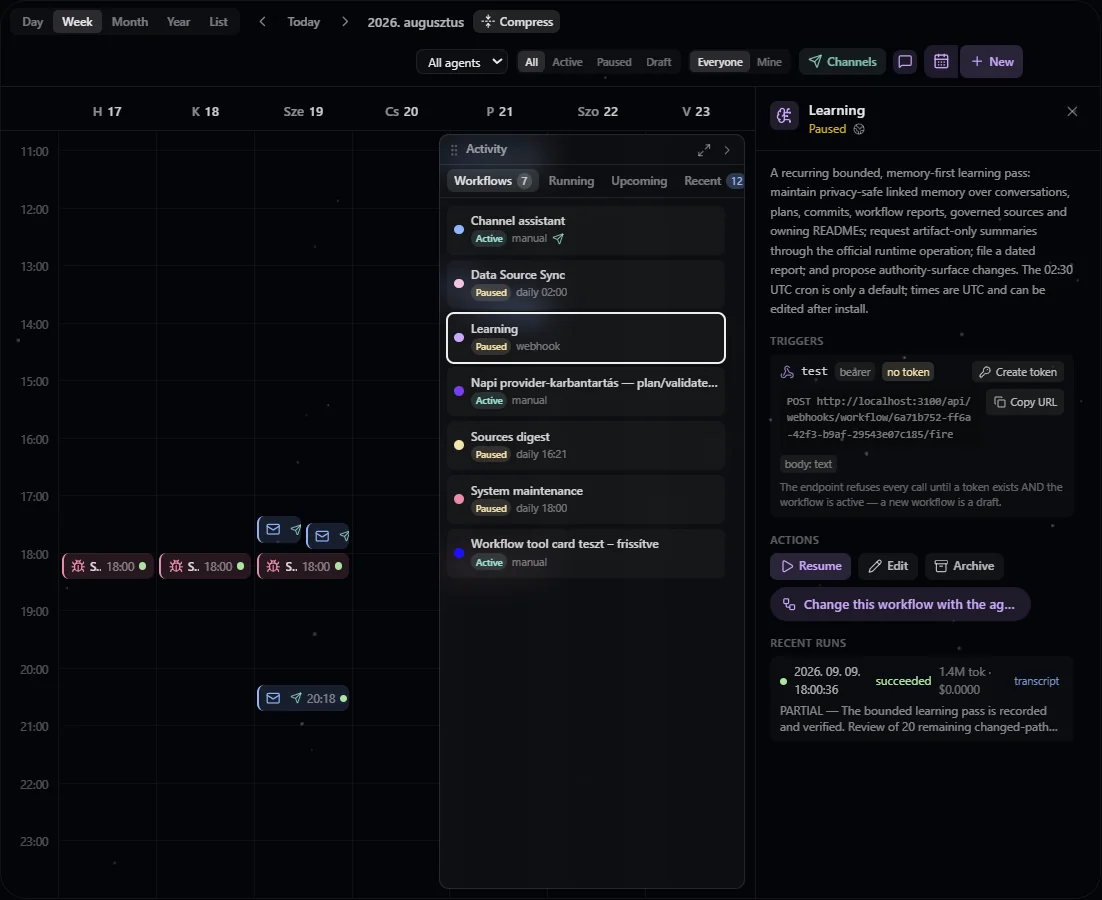
Calendar in a configured installation, with workflow activity and channel controls beside the schedule.
- Views. Day and Week are minute time-grids with an animated "now" line; Month shows entry pills with run-status density dots; Year is twelve mini-months with an activity heat tint per day. In Day and Week, long empty stretches collapse into slim dashed bands (the hour around every occurrence and the current hour stay open) so the busy part of the day fills the viewport — click a band to expand it, or turn the toolbar Compress toggle off for the full 24-hour grid. Workflows bound to a messaging channel carry a small send icon on their chips and pills.
- Occurrences. The widget asks the server for a date range and receives the visible entries plus dated slots: past slots come from persisted runs (with status and outcome), future slots from bounded schedule expansion seeded from live trigger state, and skipped fires appear as explicit markers. Expansion is capped — a response flags when it was truncated.
- Live updates. Run lifecycle and entry changes stream over the workspace's single realtime connection — the same feed the chat's workflow cards and the conversation picker follow. Nothing is sent to a caller without workflow read access, and every event is re-checked against the caller's visibility before it is sent, so private workflows never leak. Everyone watching the calendar sees a colleague's run start pulsing in the activity rail without reloading — the rail also shows who each run executes as. Its Workflows tab lists every workflow visible under the current filters — including manual-only ones that never appear on the grid — and its Running, Upcoming and Recent tabs follow the calendar's current view scope: the day, week, month, or year you are looking at is the window. The rail can be dragged sideways, expanded to a wide reading mode, and stays in place when you select a workflow — the inspector opens beside it.
- Creating and editing entries. One form serves all three paths — blank creation, installing a package-shipped workflow template (the template's declared inputs render on top, its instruction stays a preview, and every template card shows its source package and trust tier before you install), and editing. Every common field — the trigger (Schedule, Webhook or Manual), conversation mode, visibility, max runtime, color and icon — is editable in all three, each with a one-line explanation; picking Webhook also opens that hook's body contract (body mode and optional schema, size limit, event-id source, and whether a caller may wait for the run), and channel bindings can be added right in the create flow (they attach the moment the workflow exists). Schedule presets are input sugar only — the stored format is always a canonical cron expression plus an IANA timezone, and a timezone picker in the schedule header lets you set the zone the schedule fires in (it defaults to the entry's stored zone, so editing a workflow never silently shifts its schedule for other viewers). A max runtime field sets the per-run wall-clock cap (not the run's only bound — the agent's step budget limits it too, so work that must run for hours needs both raised), and a Model field picks the runs' model from the platform catalog (Agent default follows whatever the agent is currently set to). A new entry is saved as a draft or created and activated in one step — the choice is always explicit. Saving from one trigger tab never drops the others: a Webhook save keeps the stored schedules and every other hook, a Schedule save keeps the other schedules and every hook, and a Manual save removes the schedules but keeps every hook — so turning a scheduled workflow into a webhook-only one takes two saves, Manual then Webhook. Every trigger a save does not change keeps its live state — fire counters, bounds and a webhook's key — and agents can make the same edits through the workflow tool.
- Per-workflow packages. The editor can narrow which packages (and individual contribution files) a workflow's runs may use — the same selector idea as the chat composer's per-conversation package toggle. It is strictly disable-only: a workflow runs as its creator, so the scope can remove capabilities from its runs but never grant anything beyond what the agent's own configuration allows.
- Run outcomes. The engine captures a short result summary (the
first ~280 characters of the run's final assistant message) onto each run
— a green checkmark alone doesn't tell you whether the task did anything
useful. Each finished run also records its own usage (tokens and
estimated cost for exactly that run's slice of the conversation), shown on
the rail's recent list, the inspector's run rows, and the List view. The
inspector lists recent runs with their summaries and opens a read-only
transcript of any run. While a run is still running the transcript updates
live (it shows "Run in progress…" until output arrives) instead of waiting
for the run to finish. From there, Open in chat hands the run's
conversation to the chat panel — useful for continuing a
continue-mode bot thread or replying where a run left off; because each agent has its own workspace, opening another agent's run keeps the Calendar visible alongside the chat rather than replacing it. An agent sees the same summary, shortened and next to the run's transcript — a preview, never the answer: the full answer is in the conversation transcript, which it reads like any other. - Runs that hand work to background subagents stay open until that work ends.
When an agent dispatches background subagents, the run no longer finishes at the
moment the agent stops typing — it stays
runningon the calendar until every subagent has released its slot, and only then records its finish time and its usage. So the duration and the cost describe the real work: one measured run stayed open almost ten minutes longer and recorded twenty times the tokens it used to. Two consequences worth knowing: such a run holds one of the platform's concurrent-run slots for that whole time, and a subagent that pauses for someone's approval releases its slot while still unfinished, so the run can close ahead of it. The one-line result summary on the calendar row is not covered by this: it is still taken from the agent's own last message before it handed off, so a run that dispatched background work typically summarises the hand-off rather than the outcome. Open the run's transcript for the finished answer. A run bound to a messaging channel is different — there the hand-off note and the finished answer are both delivered, each as its own message, as the agent writes them (see Channels). - List view. Next to Day/Week/Month/Year there is a List mode with the same filters: one row per workflow — including manual-only workflows and, via the Archived status chip, archived ones — with its schedule, next fire, last run (status and usage), and inline actions: run now, pause/activate, edit, archive, and for archived entries restore or permanent delete (two-step, and it tells you exactly what is removed).
- History hygiene. Workflow-born conversations carry an origin badge in the conversation picker, and the picker can filter history to Interactive or Workflows — daily schedules generate dozens of conversations a month, and the filter keeps the list scannable.
Default templates
The core packages ship a small, curated set of templates — all install as drafts (activation is always an explicit step), and every shipped cron defaults to UTC (edit the schedule after install):
| Template | Package | Default schedule | What it does |
|---|---|---|---|
| Daily digest | agent-core | weekdays 09:00 | Recurring briefing on a topic, with carry-over state between runs. |
| Channel assistant | agent-core | manual | Talk to your agent from Telegram/WhatsApp: a continuous conversation thread; install, then bind one of your channel connections. |
| Learning | agent-core | daily 02:30 | A self-improvement pass over recent activity (see below). |
| System maintenance | admin | daily 07:00 | Platform-health report for owners/admins: audit anomalies, membership drift, credential catalog health, trust posture, usage. Reports everything; remediates only within a narrow closed list. |
| Sources digest | brain-core | weekdays 08:00 | What changed across your synced sources since the last run, with hygiene flags for stale or contradicting docs. |
| Web watch | machine-core | daily 09:00 | Browser monitor: visits URLs, diffs meaningful content against the previous snapshot, reports only real changes — pairs with a channel binding for alerts. |
Each template is visible only to users whose grants cover what its runs need — for example System maintenance never appears to non-admins, and Web watch requires machine access. A template that declares announce delivery installs with delivery already enabled; routing still needs a channel binding you create.
When a template ships a new version
A shipped template can change — the package that owns it improves the instruction. Because an install copies the instruction rather than linking to it, a new version never rewrites what you are running. Instead every stale copy is paused with a recorded reason, and the calendar shows a banner offering two ways forward. The banner is derived from the version numbers, not from the pause, so resuming the workflow does not make it disappear while the workflow is still stale.
- Upgrade — offered while nobody has edited the instruction since the template last wrote it. The new version is re-rendered with the answers stored from the install form; inputs nobody answered take the new version's defaults. Nothing is written on the first click: the calendar shows a preview — every input with its value and where it came from, the defaulted ones first, then the full new instruction — and only Confirm upgrade applies it. A workflow installed before answers were stored says so, because a default can differ from what its current text says. The workflow keeps its identity, so its run history, its state folder and its channel bindings all survive — which is what re-installing could never do.
- Merge with the agent — the path for a copy you have edited. It hands the job to the agent in the chat composer, already naming the workflow and the two versions, and the agent reconciles your edits with the new version and writes the merged instruction back. An upgrade never silently overwrites an edited instruction.
Either way the new instruction never runs unreviewed: a workflow that was active comes out of the upgrade paused, a paused one stays paused, and a draft stays a draft. Reviewing the new instruction and resuming is a deliberate step, the "upgrade required" pause clears itself because it is no longer true, and whoever performs the upgrade becomes the identity the workflow runs as from then on — the same rule that applies to editing the instruction by hand, because in both cases somebody changed what the agent will be told to do. If the new version asks for an input the workflow has no answer for, the upgrade refuses and names the input rather than filling it in.
The calendar offers each action only to callers whose request would be accepted: resuming, pausing, editing, archiving, upgrading and handing a change to the agent need the right to edit the workflow, while Run now and cancelling a run need the right to run it.
Agents can do all of this too, through the manage-workflows skill's upgrade
script — with a dry run that names every input and its source, an optional set
of new answers, and the merged instruction for an edited copy.
The Learning workflow
The Learning template is the deployed-state self-improvement loop, and the daily cron is only a default — set any cadence. One pass:
- Inventory within fixed limits: metadata-first reads across conversations, plans, commits, workflow reports, changed governed sources, and package changes. Numeric item, depth, and byte caps checkpoint a resumable backlog.
- Curate linked memory (the primary output): keep concise interpretations and canonical evidence links in privacy-safe memory rather than copying conversations, plans, diffs, reports, READMEs, or dataset rows. A deterministic authority/privacy matrix merges only exact same-owner and same-scope facts, preserves separate user profiles, repairs only uniquely verified renames, and treats code or its owning README as authoritative over stale memory.
- Request summaries through the official operation: for at most a few high-value threads (reusable decisions, corrections, constraints, unresolved evidence, or artifact pointers — greetings, smokes, and low-information threads are skipped), it requests an artifact-only conversation summary through the official summarize operation. It never writes a conversation folder directly, and a thread that is actively streaming is simply skipped, not retried in a loop.
- Report and propose: write the dated report with exact mutations,
non-mutations, ambiguities, orphans, and backlog. With
AUTO_APPLYfalse (the default), report, memory, workflow-state, and the official artifact-only summary writes are still allowed — only edits to authority surfaces (identity, docs, config, roles, credentials, packages, schedules) remain proposals.
The pass activates the skill with the supported execute skill-call shape and is
self-improving by construction: the skill ships a read-only methodology playbook,
the workflow copies it into its own state folder on first run, and a pass folds back
only a newly proven reusable lesson. Git evidence explicitly chooses governed Git
routes, an external GitHub MCP for hosting-platform collaboration, or raw shell Git for
quick local reads. Scheduled Learning uses the report and state playbook for continuity
and never reads or writes identity files; identity changes remain proposals. The skill
works manually too — the workflow is just its scheduled driver.
Storage
Workflows live in the agent's data subtree:
data://agent-core/<agentId>/workflows/<workflowId>/
├── entry.json              the workflow entry
├── state/                  durable scratch space for the agent between runs
├── instruction-revisions/  immutable history of the instruction, one file per revision
└── runs/<runId>/
    ├── meta.json           run status, timing, trigger kind
    └── events.jsonl        bounded operational log (lifecycle + tool activity)
events.jsonl is an operational log, not the transcript — the transcript is
the conversation the run streamed into, linked from the run meta. When a run
creates its conversation, the conversation is stamped with a workflow origin
marker, and the conversation picker shows a workflow badge for it.
URI policies isolate the tree the same
way conversations are isolated: an agent reads its own workflows, foreign
agents' workflow subtrees are unreadable by default with an owner/admin
override, and runs/** is engine-written — read-only for everyone. The
instruction history is write-protected by an immutable
floor: no filesystem tool or
route can write it, not even the owning agent or an owner/admin, so only the
internal service that records instruction changes can — and the rule repairs
itself into existing deployments on every start. Reading stays open to the
workflow's own agent: comparing the current instruction against the last text the
template wrote is how an upgrade knows whether anybody edited it.